Robot Gallery & Deep Links
The Robot Gallery is a curated set of open-source robot descriptions — arms, quadrupeds, humanoids, and more — that you can import into ARMOR in a single tap, without downloading a ZIP or hunting for a URDF folder yourself.
Opening a robot from the gallery
Every robot page in the gallery has an Open in ARMOR button. Tapping it on an iPhone, iPad, or Mac with ARMOR installed:
- Launches ARMOR via a Universal Link (
https://armor.dc-engineer.com/gallery/<slug>/?variant=<id>) or thearmor://gallery/<slug>?variant=<id>custom URL scheme if the Universal Link doesn’t resolve. - Shows an import confirmation sheet with the robot’s name, vendor, license attribution, file count, and total download size.
- Downloads the URDF (or Xacro tree, or archive — see Delivery modes below) and every mesh it references, verifying each file’s SHA-256 checksum as it arrives.
- Opens the finished project automatically once every file is verified.
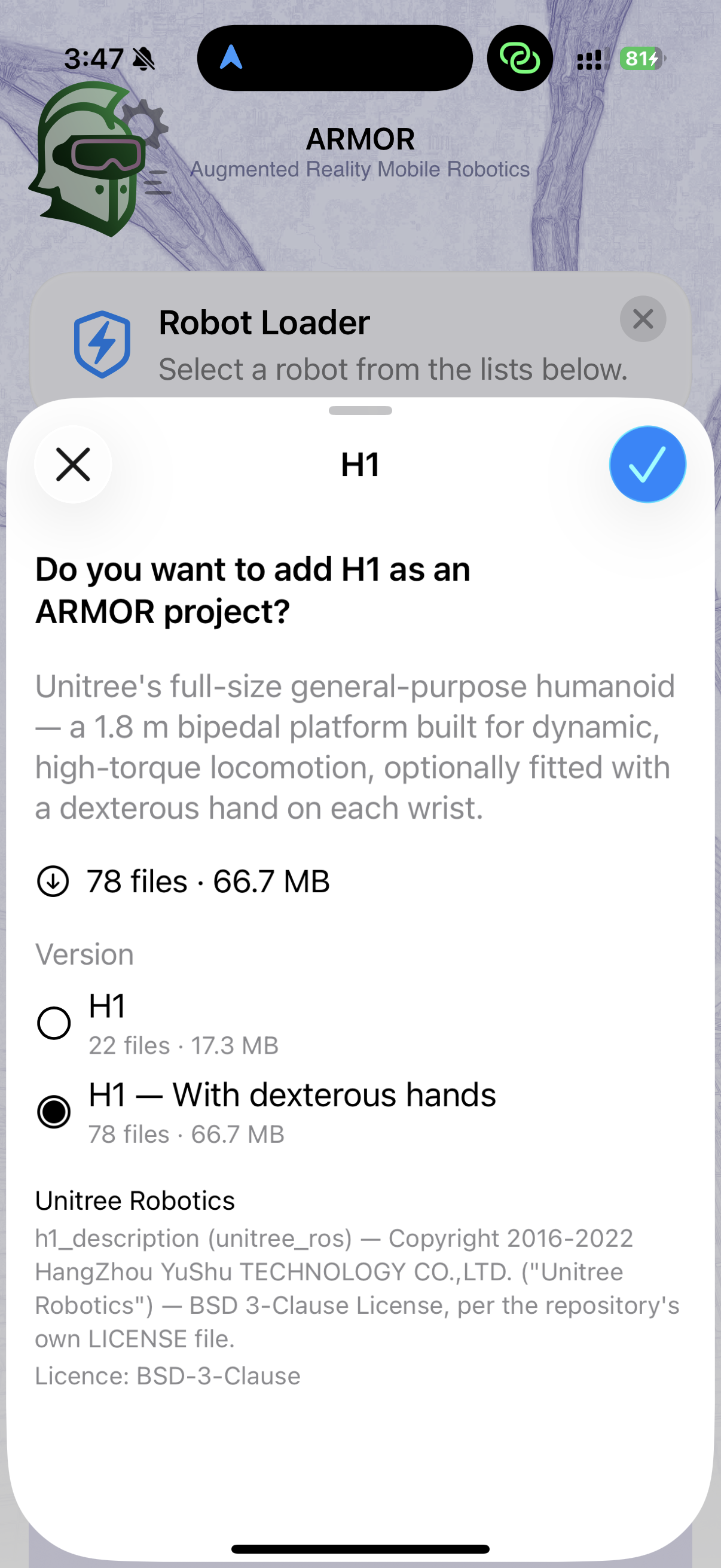
The import confirmation sheet for a gallery deep link — variant picker, file count and size, and full license attribution, all before anything downloads.
If you don’t have ARMOR installed yet, the same link takes you to the App Store instead.
Reopening a link you’ve already used
Gallery links are idempotent by design. ARMOR derives each project’s identity from the robot’s slug and variant, so tapping the same gallery link again reopens your existing project rather than creating a duplicate. This makes it safe to re-share or bookmark a gallery link — anyone who taps it lands on their own single copy, and tapping it again yourself never clutters your library.
License attribution, every time
Every gallery entry links directly to its original upstream repository rather than re-hosting the files — nothing is re-packaged or modified. The import confirmation sheet always shows the license under which the files are published and a direct link to the upstream source, so you know exactly what you’re agreeing to before anything downloads. See each robot’s own gallery page for its full license and attribution notice.
Delivery modes
Not every upstream repository publishes robots the same way, so gallery links use one of three delivery modes behind the scenes — this only matters if a download behaves unexpectedly and you want to understand why:
| Mode | What it means for you |
|---|---|
| Files | The most common case: a URDF file plus individually downloaded mesh files, fetched and checksummed in parallel. |
| Archive | The robot’s meshes ship as a single ZIP from upstream (for example, robots with very large mesh sets). ARMOR downloads and extracts it on-device. |
| Xacro | Some robots (for example, robots with parametric arms or grippers) are published only as .xacro templates rather than a plain URDF. ARMOR expands the macros on-device — see Xacro Support for what that means for the resulting model. |
A broken or expired link
If a gallery link 404s, the robot it pointed to is no longer part of the live gallery (for example, if licensing changed or the upstream repository was taken down). This isn’t a bug to report — just head back to the gallery index for the current list.
Next Steps
- Loading URDF Files — the manual import flow, for URDFs that aren’t in the gallery.
- Xacro Support — how ARMOR expands Xacro templates on-device.
- Browse the Robot Gallery itself.