Basic Workflow
ARMOR is a professional robot design and simulation app for iOS and macOS, built for engineers working with ROS, URDF, and MuJoCo. The interface is organized around three main panels: the Sidebar, the Robot Detail View, and the Project Editor.
The Sidebar
The sidebar (or first screen on iPhone) is your project home. From here you can:
- Browse example models — ARMOR ships with pre-built robots to explore what’s possible with URDF and MuJoCo
- Load your own robots — user-created and imported projects appear in their own section
- Import a URDF file — load any robot described in URDF, the industry-standard XML format used in ROS and solvers like Gazebo and Drake
- Create a new model — start a robot from scratch using the built-in editor
- Manage your subscription — the bottom of the sidebar shows your current premium status and an upgrade option
Tapping a robot shows its link and joint counts and any description you’ve provided, then opens the detail view.
The Robot Detail View
The detail view is where you’ll spend most of your time. It has three tabs:
- 3D (Virtual) — a standard CAD-style viewport you navigate with one- or two-finger gestures. Optional axes, grid, and display overlays are available. Buttons in the lower-left adjust visualization, and buttons in the lower-right provide quick access to common edits.
- Spatial — places your robot in AR, overlaid on real-world surfaces detected by the device camera and LiDAR sensor (iPhone and iPad Pro).
- XML — displays the full text of your URDF and SRDF files with IDE-style syntax highlighting and a selectable theme.
The Project Editor
Tap the notebook icon in the top toolbar to open the project editor. On Mac, the same editor opens as an Inspector panel docked to the side of the window instead of a sheet, toggled from the toolbar so it stays open alongside the 3D view. It has four sections:
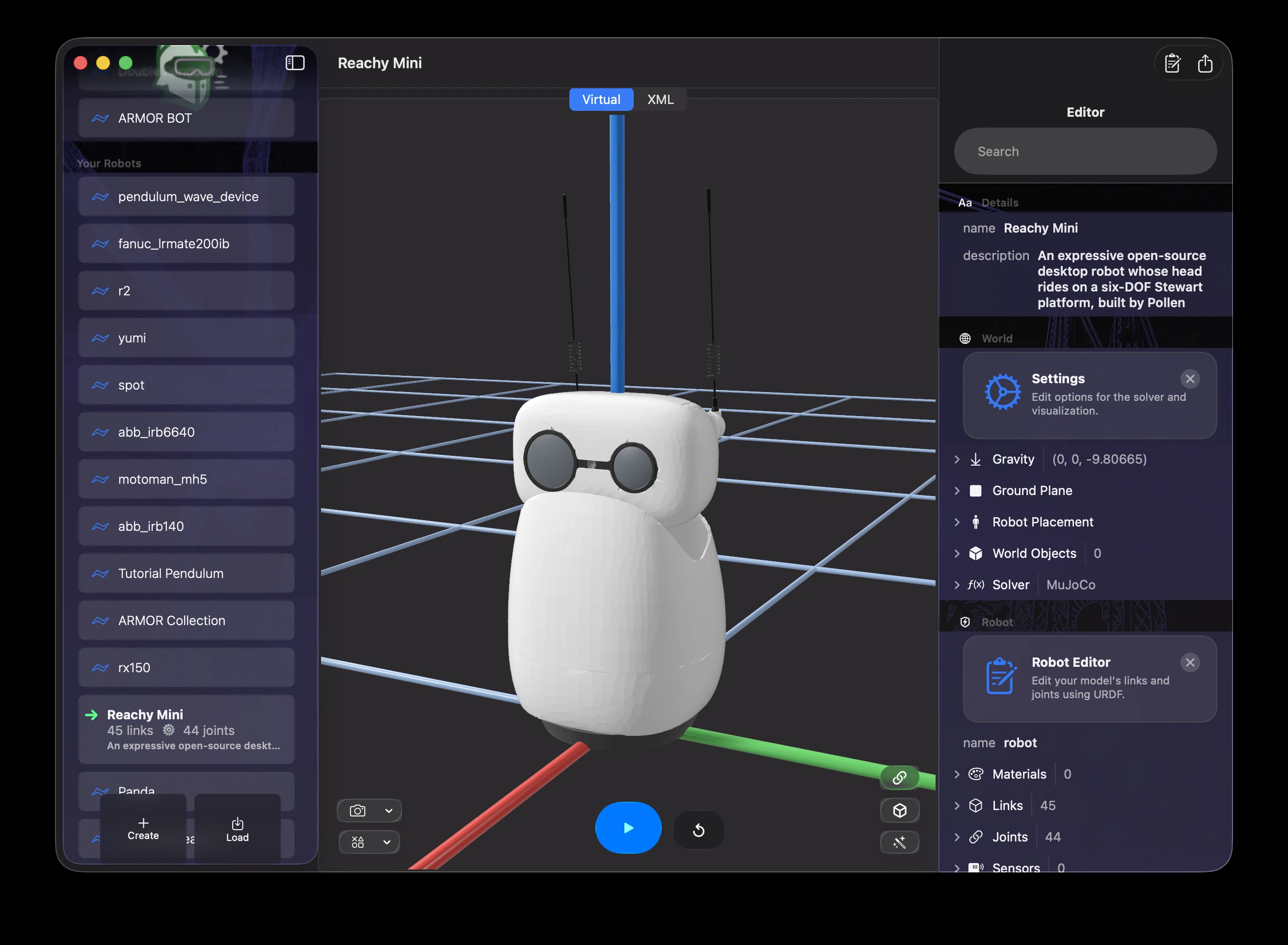
ARMOR on macOS — the Inspector panel (right) is the same Project Editor, docked instead of presented as a sheet.
- Details — the project’s name and description
- World — the simulation environment: gravity, the solver and timestep, the ground plane, robot placement, and world objects
- Robot — expand and edit the properties of every link, joint, material, sensor, and transmission in your URDF file; designed for fast iteration by experienced robotics engineers
- Semantics — define joint groups, state values, and other SRDF properties
Next Steps
- See Finding URDF Files for vendor and GitHub repositories of open-source robot models.
- See Robot Simulation on iPhone and on iPad for how this workflow looks on each device.
- See Built-In Help and Ask for searching the docs and asking questions about your robot inside the app.
- See Loading URDF Files for details on supported file formats and folder imports.
- See Links and Joints to learn how they are defined — the fundamental building blocks of every robot in ROS and MuJoCo.
- See the Robot Editor for a deep dive into creating and modifying robot components.
- See Camera Controls and Augmented Reality for a full guide to camera modes and spatial visualization.