Exporting URDF & MJCF Archives
ARMOR can export your robot as a self-contained archive — a ZIP file bundling the robot’s description files together with every mesh asset it references. A single export produces the URDF, the MJCF (MuJoCo) XML, and the SRDF semantics side by side in the same archive, so the one package is ready to drop into both ROS-based and MuJoCo-based toolchains on the desktop.
What’s in the archive
When you export a robot archive, the ZIP contains:
- URDF — the Unified Robot Description Format XML used by ROS, Gazebo, Drake, and Isaac Sim.
- MJCF — the MuJoCo XML model, exported alongside the URDF from the same robot.
- SRDF — the semantics file (joint groups and group states), included automatically if you have defined any.
- Assets — all referenced mesh files, collected into the archive with their paths rewritten so the model loads cleanly on another machine.
- World context (MJCF) (Premium) — the compiled MJCF includes your world configuration: the checker-pattern ground plane, friction settings, robot placement (fixed or free base), and any box, sphere, or cylinder obstacles you added. What you see in the MJCF XML tab is what ships in the archive.
Because the URDF, MJCF, and SRDF are all generated from the same in-app model, the archive stays internally consistent — no manual re-export step when you switch simulators.
What you simulate is what you export
The in-app MuJoCo simulation and the exported MJCF share one build pipeline — the same code that compiles the model for on-device physics produces the file in the archive. This means:
- A fixed base is welded the same way on-device and in the export.
- A free-floating base receives the same free joint in both.
- Multi-robot scenes (Premium) export as a single composed MJCF with every robot in its correct pose and base type, using MuJoCo’s
mjs_attachscene-composition API so joint and geom names never collide. - The ground plane, obstacles, gravity, and scene lighting (directional light + reflective floor) are all baked into the MJCF so the scene looks correct out of the box when you open it with
simulateon the desktop.
There is no separate “export step” — press export and get the same model you’ve been running.
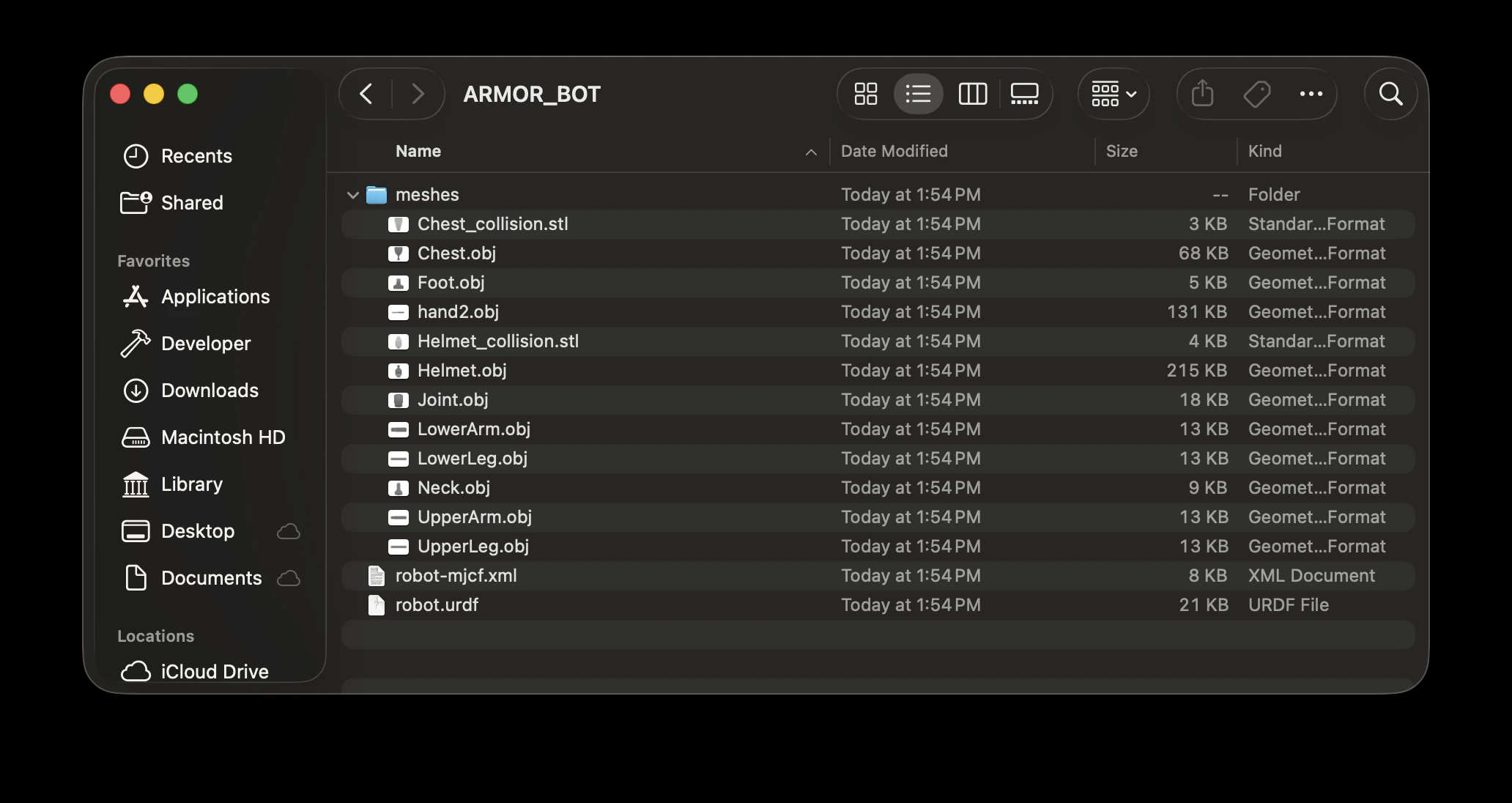
An exported package: robot.urdf and robot-mjcf.xml sit at the top level, while the meshes/ folder holds the converted assets — here visual meshes as .obj and collision meshes as .stl. Choosing a different export format re-converts every mesh in this folder to match.
Automatic asset conversion
ARMOR can convert every mesh in the archive into any 3D format you choose at export time, so the package is compatible with whatever software you are importing into. Pick from OBJ, DAE (Collada), GLB, or STL, and ARMOR re-encodes all of the model’s assets to that format and rewrites the description files to match.
This means you do not have to hunt down the original meshes or run a separate conversion tool — choose the format your target program expects, and the archive is ready to use.
Choosing a mesh format for your tool
Different desktop tools support different mesh formats. Use this table to pick the right one when exporting an archive:
| Tool | OBJ | STL | DAE (Collada) | GLB / glTF | Notes |
|---|---|---|---|---|---|
| MuJoCo | ✅ | ✅ | ❌ | ❌ | OBJ preserves texture coordinates; STL does not |
| ROS / RViz | ❌ | ✅ | ✅ preferred | ❌ | DAE carries material and color data; STL is geometry-only |
| Gazebo Classic | ✅ | ✅ | ✅ preferred | ❌ | DAE required for textures and materials |
| Gazebo Harmonic+ | ✅ | ✅ | ✅ | ✅ GLB | Full ASSIMP support; all four formats work |
| Drake | ✅ preferred | ❌ | ❌ | ✅ .gltf only | .glb container files are not supported — use .gltf or OBJ |
| NVIDIA Isaac Sim | ✅ | ✅ | ✅ | ✅ | Broad ASSIMP support; OBJ and STL are most reliable for URDF import |
Recommendation: OBJ offers the widest compatibility across all listed tools. For ROS and Gazebo workflows where material fidelity matters, use DAE (Collada). For MuJoCo, OBJ preserves texture coordinates that STL cannot.
Using the archive on the desktop
Unzip the archive on your computer and load the description file that matches your tool:
- MuJoCo — open the MJCF XML (export meshes as OBJ or STL).
- ROS / Gazebo — use the URDF with DAE meshes to preserve materials; SRDF provides joint groups for MoveIt.
- Drake — load the URDF with OBJ or glTF meshes.
- NVIDIA Isaac Sim — import the URDF (OBJ/STL are most reliable for the URDF importer).
Next Steps
- To export a single visual model for rendering or the web, see Exporting 3D Models.
- For details on the formats ARMOR can import, see Loading URDF Files.
- To define the joint groups stored in the SRDF, see Semantics.
- To configure the world context embedded in the MJCF export, see Worlds & Robot Placement.