Transmissions
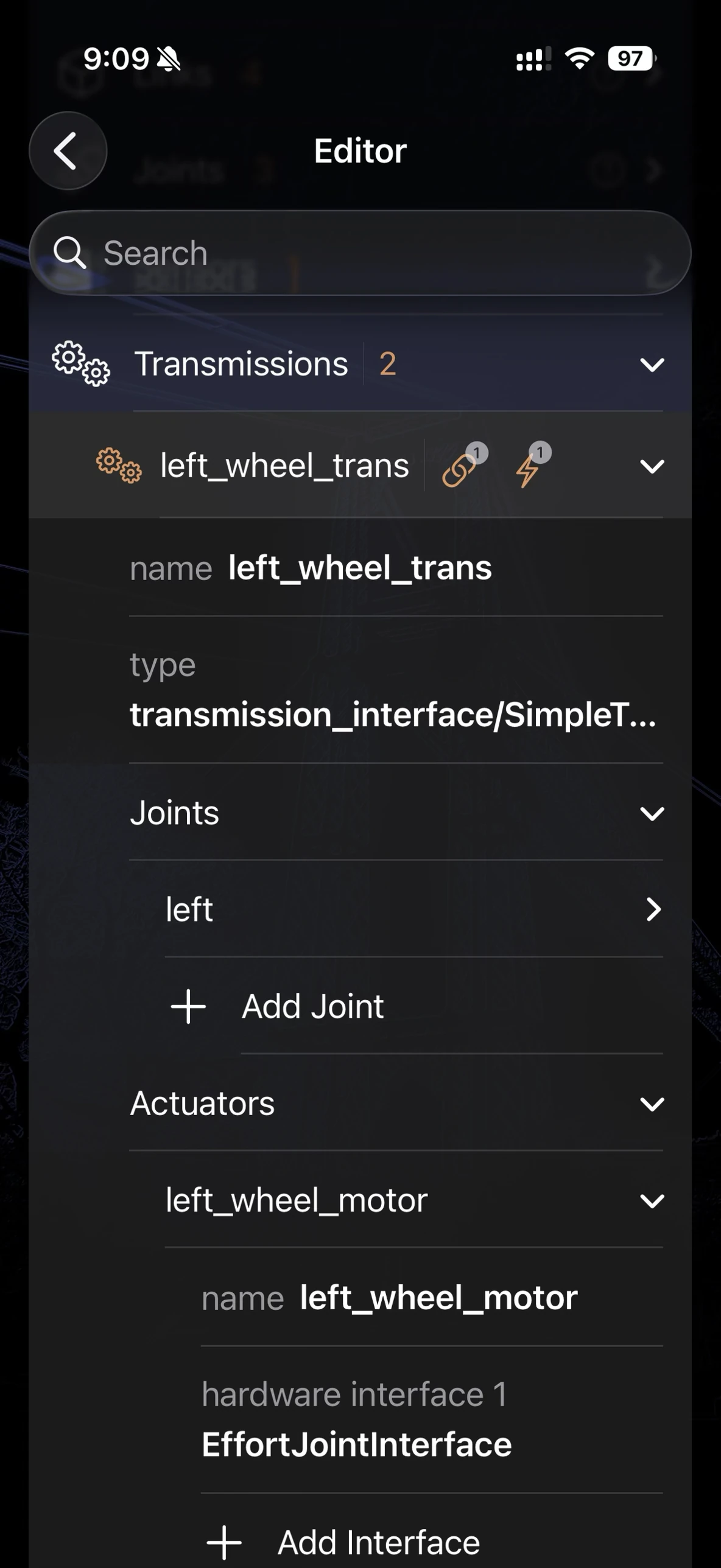
The Transmissions group in the Robot Editor, expanded on a wheel-drive transmission — one joint, one actuator, matching the common one-to-one case described below.
The <transmission> tag is an older URDF extension — predating ros2_control — that describes how one or more actuators drive one or more joints: gear ratios, hardware interface names, and (for linkages like differentials) multi-actuator-to-multi-joint mappings that a plain joint/link tree can’t express on its own. It’s the convention ros_control and Gazebo Classic expect, and plenty of real robot URDFs still carry it alongside — or instead of — a newer <ros2_control> block. For the format itself, see the ROS ros_control transmission documentation.
Premium feature: Sensors and Transmissions are part of ARMOR Premium.
Editor Interface
Open the Robot Editor from the toolbar and tap the Transmissions row, just below Sensors. Each transmission is a disclosure group containing:
| Field | Description |
|---|---|
| Name | A unique string identifying the transmission. |
| Type | The transmission interface class, e.g. transmission_interface/SimpleTransmission (the default) or transmission_interface/DifferentialTransmission for linked joints. |
| Joints | One or more joints this transmission drives. |
| Actuators | One or more actuators driving those joints. |
A transmission with one joint and one actuator is the common case; linkage transmissions (differentials, four-bar mechanisms) use multiple of each.
Joints
| Field | Description |
|---|---|
| Joint | Picked from your model’s existing joints when any exist, otherwise a free-text name. |
| Hardware Interface(s) | One or more interface strings, e.g. EffortJointInterface — add as many as the joint exposes. |
| Offset | An optional position offset between the actuator and joint reference frames. |
Actuators
| Field | Description |
|---|---|
| Name | A unique string identifying the actuator. |
| Hardware Interface(s) | One or more interface strings, same convention as a joint’s. |
| Mechanical Reduction | The gear ratio between actuator and joint motion — defaults to 1.0. |
| Motor Torque Constant | Optional, for current-to-torque conversion. |
| Pulses Per Revolution | Optional, for encoder resolution. |
As with sensors, transmissions have no Wizard Sheet or 3D-view counterpart — the Editor Panel is the only way to view or change them.
URDF Structure
<transmission name="shoulder_trans">
  <type>transmission_interface/SimpleTransmission</type>
  <joint name="shoulder_joint">
    <hardwareInterface>EffortJointInterface</hardwareInterface>
  </joint>
  <actuator name="shoulder_motor">
    <hardwareInterface>EffortJointInterface</hardwareInterface>
    <mechanicalReduction>100.0</mechanicalReduction>
  </actuator>
</transmission>
<transmission> elements live at the top level of the <robot>, as siblings of <link> and <joint> — not nested inside either.
A note on Xacro
Many real-world Xacro files only emit their <transmission> blocks when a macro argument like gazebo:=true is set, since they’re meant for a Gazebo-driven simulation path rather than every consumer of the URDF. ARMOR’s Xacro support honors these conditionals like any other — if a robot you import shows no transmissions, check whether its source Xacro gates them behind an argument ARMOR (or you) left at its default.
What ARMOR preserves — and what it doesn’t
Transmissions are preserved, not simulated. ARMOR round-trips <transmission> data faithfully — import, edit, export — but nothing in ARMOR’s own MuJoCo-based simulation reads it. A joint’s actual motion in ARMOR comes from a completely separate, newer mechanism: see ros2_control Actuators for the <ros2_control> block that does compile into a live MuJoCo actuator with physically computed gains. It’s common for one robot to carry both — legacy <transmission> tags for Gazebo/ros_control compatibility, and a <ros2_control> block for everything ARMOR (and modern ROS 2 simulation) actually drives. Editing a transmission here doesn’t change how that same robot behaves in ARMOR’s own simulation; it changes what ships in the URDF for Gazebo, MoveIt, or any ros_control-based tool downstream.
Related
- Sensors — the other half of ARMOR’s Premium editing tier.
- ros2_control Actuators — the mechanism that actually drives joint motion in ARMOR.
- Joints — the joints a transmission’s picker draws from.
- Xacro Support — why a transmission might be conditionally absent.