Sensors
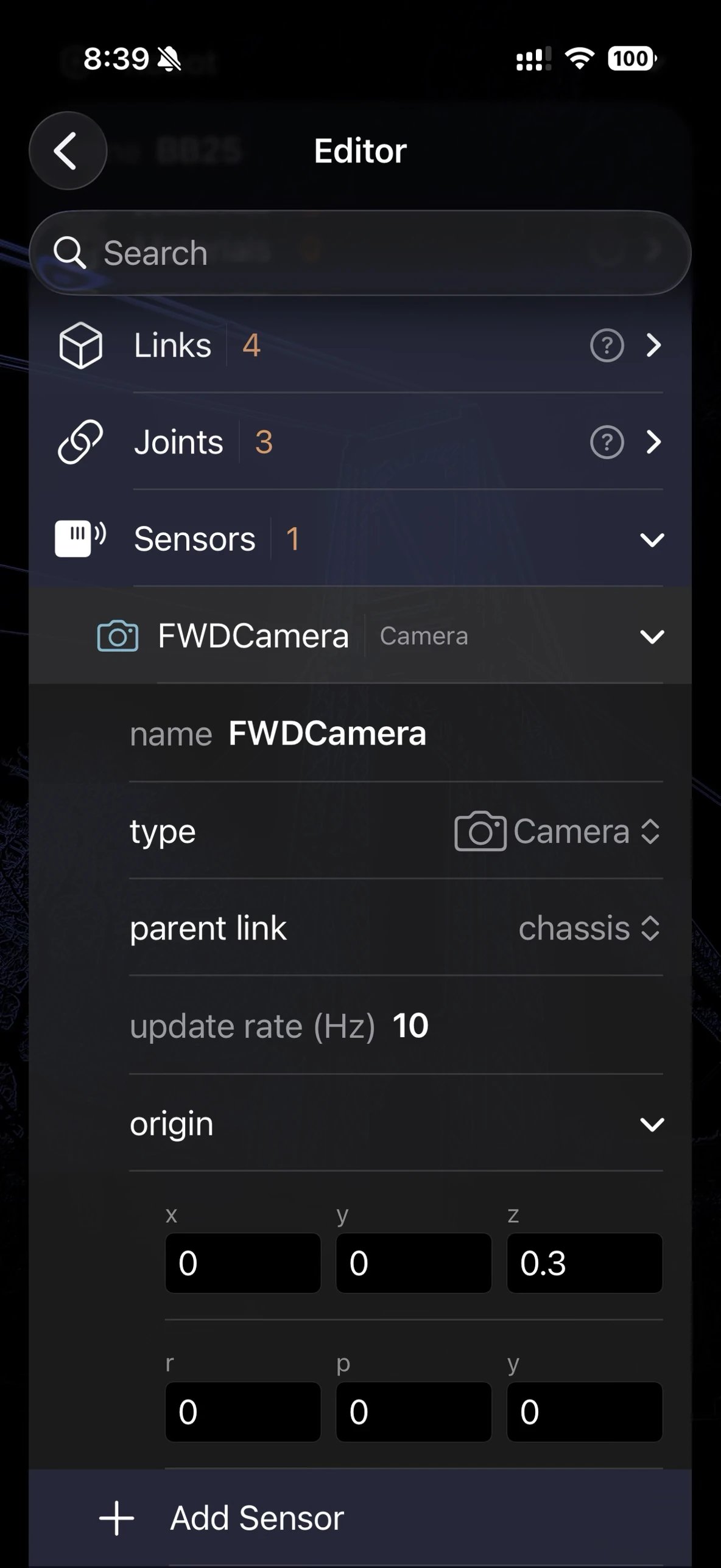
The Sensors group in the Robot Editor, expanded on a Camera-type sensor — every field maps directly to the URDF it reads from and writes back to.
In URDF, sensors aren’t part of the core specification — they’re an extension that Gazebo popularized, expressed as <sensor> elements nested inside a <gazebo reference="link_name"> block attached to a link. ARMOR reads and writes this same convention, so a sensor you add in ARMOR round-trips cleanly through Gazebo, ros_control, and any other tool that expects it in the standard place. For the underlying format, see the Gazebo sensor SDF reference.
Premium feature: Sensors and Transmissions are part of ARMOR Premium.
Editor Interface
Open the Robot Editor from the toolbar and tap the Sensors row, just below Joints. Each sensor appears as a disclosure group with:
| Field | Description |
|---|---|
| Name | A unique string identifying the sensor. |
| Type | camera, imu, ray (lidar), or force_torque — selected via picker. |
| Parent Link | The link the sensor is attached to — picked from your model’s existing links, same constraint as a joint’s parent/child. |
| Update Rate | How often the sensor reports, in Hz. |
| Origin | The sensor frame’s position and orientation relative to its parent link. |
Switching Type swaps in the matching sub-section below and discards any other type’s fields — a sensor is always exactly one type, never several at once.
Unlike joints, sensors have no Wizard Sheet or 3D-view gizmo — they’re edited from the list only, and don’t currently render a visual indicator (like a camera frustum) in the 3D view.
Camera
| Field | Description |
|---|---|
| Name | Optional camera name, distinct from the sensor’s own name. |
| Horizontal FOV (rad) | Horizontal field of view. |
| Image Width / Height (px) | Rendered frame resolution. |
| Image Format | Pixel format string, e.g. R8G8B8. |
| Clip Near / Far (m) | Near and far clipping planes. |
IMU
Gaussian noise parameters for the two measurement channels:
| Field | Description |
|---|---|
| Linear Acceleration — Mean / Std Dev | Noise applied to the accelerometer axes. |
| Angular Velocity — Mean / Std Dev | Noise applied to the gyroscope axes. |
Ray (Lidar)
| Field | Description |
|---|---|
| Horizontal Samples | Number of rays per scan. |
| Horizontal Resolution | Angular resolution between samples. |
| Min / Max Angle (rad) | Horizontal scan sweep. |
| Range Min / Max (m) | Minimum and maximum detectable distance. |
Force-Torque
| Field | Description |
|---|---|
| Frame | Which body the measurement is expressed in — parent, child, or sensor. |
| Measure Direction | parent_to_child or child_to_parent. |
URDF Structure
A sensor you add to a link named camera_link is written as:
<gazebo reference="camera_link">
  <sensor name="head_camera" type="camera">
    <update_rate>10.0</update_rate>
    <origin xyz="0 0 0" rpy="0 0 0"/>
    <camera>
      <horizontal_fov>1.3962634</horizontal_fov>
      <image width="640" height="480" format="R8G8B8"/>
      <clip near="0.01" far="300.0"/>
    </camera>
  </sensor>
</gazebo>
IMU, ray, and force-torque sensors follow the same <gazebo reference="..."> → <sensor type="..."> shape, with <imu>, <ray>, or <force_torque> in place of <camera>.
What ARMOR preserves — and what it doesn’t
ARMOR reads only the <sensor> children of a <gazebo> block. Everything else a <gazebo> block can contain — plugins, contact/friction overrides, model-wide physics settings — is discarded on import and will be missing if you re-export. If your source URDF has a <gazebo> block with a plugin attached to a sensor, that plugin configuration won’t survive a round trip through ARMOR.
A <gazebo> block with no reference attribute configures the whole model rather than one link (used for model-level plugins or physics settings) and never contributes a sensor — ARMOR skips these entirely rather than failing to import a robot that has one.
Sensors are preserved, not simulated. ARMOR doesn’t currently render a live camera feed, generate IMU or lidar data, or compile sensors into the MuJoCo physics it runs — editing a sensor here is for authoring and exporting a correct robot description, the same way you’d configure one for Gazebo or a ROS driver stack downstream. If you’re looking for behavior ARMOR does simulate live, see ros2_control Actuators — a separate, unrelated mechanism that drives real joint motion in ARMOR’s own physics.
Related
- Transmissions — the other half of ARMOR’s Premium editing tier, for the classic
<transmission>actuator-to-joint mapping. - ros2_control Actuators — what actually moves a joint in ARMOR’s live simulation.
- Joints — the links a sensor’s
parentLinkpicker draws from.