MuJoCo Contact Parameters: Bounce and Friction
By default, a ball dropped in an ARMOR simulation lands and stops. That is not a bug. MuJoCo models every contact as a spring and damper, and its default setting is critically damped: the contact absorbs the impact without overshooting, so nothing bounces.
MuJoCo has no “restitution” or “bounciness” field. To tune a contact, ARMOR exposes MuJoCo’s own terms instead, so what you set here matches MuJoCo’s documentation and the exported MJCF. The MuJoCo computation documentation explains how MuJoCo computes contacts and soft constraints, including the time constant and damping ratio used below.
Override Contact Parameters
Open the World section of the editor panel, expand Solver, and look below Timestep. Turn on Override Contact Parameters to reveal four fields.
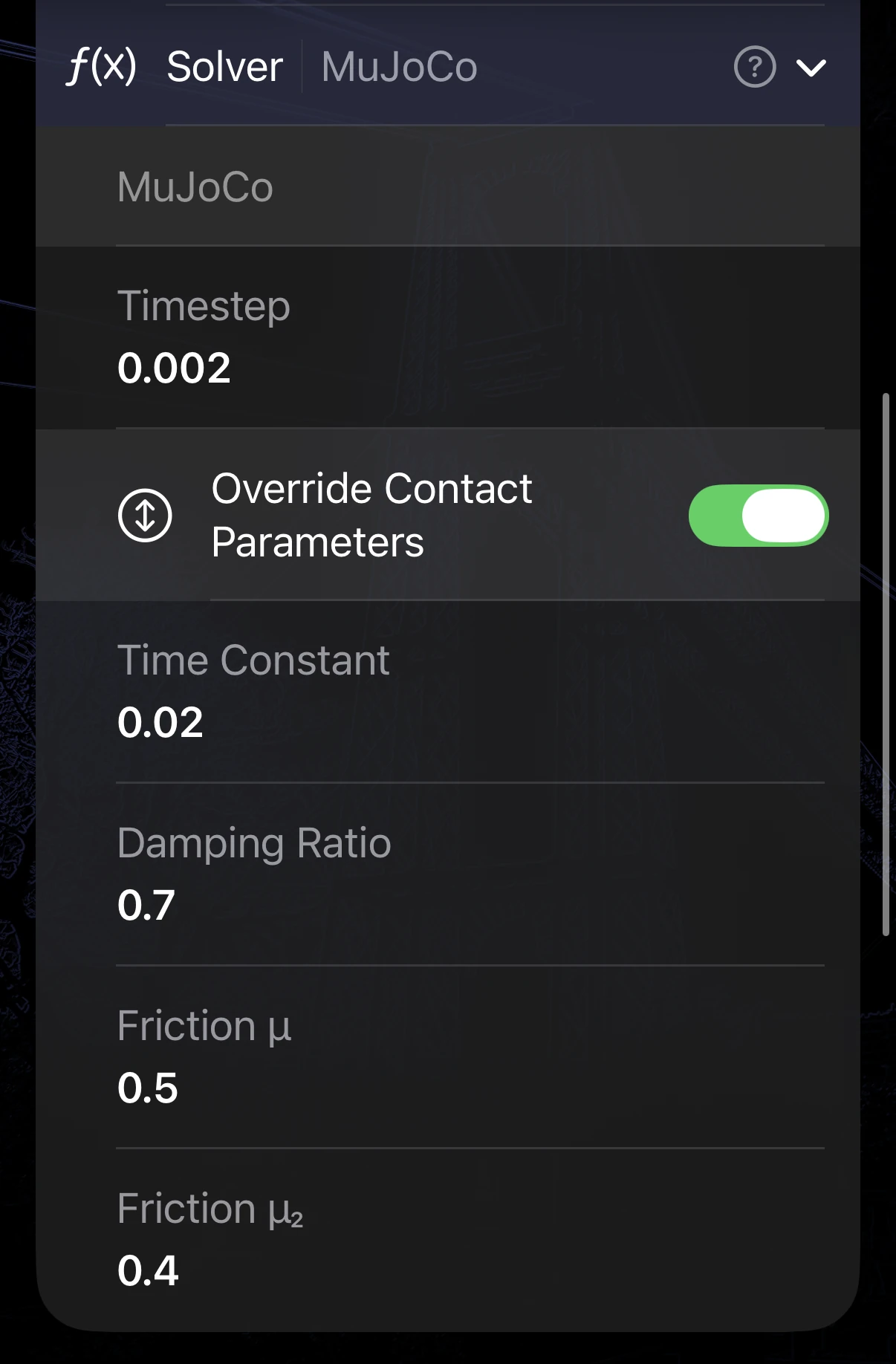
The Solver section with the override on, here with a damping ratio of 0.7 and lowered friction. The four fields appear only while the toggle is enabled.
| Field | Default | Range | What it controls |
|---|---|---|---|
| Time Constant | 0.02 s | 2 × timestep to 1 s | How quickly a contact pushes back, in seconds. Smaller is stiffer. |
| Damping Ratio | 1.0 | 0.1 to 10 | How much of the impact energy the contact absorbs. 1 is critically damped, with no bounce. Lower values bounce. |
| Friction μ | 1.0 | 0.00001 to 10 | Primary sliding friction. |
| Friction μ₂ | 1.0 | 0.00001 to 10 | Secondary sliding friction. |
The defaults are MuJoCo’s own, so turning the override on without changing a number changes nothing. The lowest Time Constant you can enter follows your Timestep, because MuJoCo clamps the contact time constant to about twice the timestep. If you shorten the timestep, a shorter time constant becomes available.
It applies to the whole scene
This is a scene-wide override. While it is on, every contact in the scene uses these values: robot to ground, robot to world object, and robot to robot. Friction settings you made on individual objects, or on the ground plane, are discarded for as long as the override is enabled. That is why friction is in the same place: you need to see and adjust it alongside bounce, or it would be overridden without notice.
Turning the toggle off restores each object’s own settings. Nothing you entered there is lost.
The override affects contacts only. It does not change joint limits or mimic joint constraints.
Tuning the bounce
Lower the Damping Ratio to make contacts bouncier. The lowest value the field accepts is 0.1, and there is a measured reason for it:
- At exactly 0, MuJoCo switches to a different branch in which the contact stores no energy, so the object does not bounce at all. Zero is not “maximum bounce”.
- Just above 0, the contact stiffness grows without a matching increase in damping. The result is wildly unphysical: in a test, a one meter drop at a damping ratio of 0.005 rebounded to nearly 2,600 meters.
- At 0.1 and above, the bounce is physically plausible, and the object loses energy on each impact.
Lower the value from 1 in small steps and press Play after each change until the bounce looks right. A higher Time Constant makes the contact softer, so the object sinks in further on impact.
In the Exported MJCF
The override is written into the MJCF that ARMOR generates, in the <option> element, so an export behaves like the app. You can see it in the XML Viewer and in an exported archive. With the override on, <option> carries o_solref (the time constant and damping ratio), o_friction, and a child <flag override="enable"/>. With it off, none of these are written.
<option gravity="0 0 -9.81" timestep="0.002" o_solref="0.02 0.3" o_friction="1.0 1.0 0.005 0.0001 0.0001">
  <flag override="enable"/>
</option>
Example Robots
The Bouncing Ball and Bouncing Pelota examples in the Robot Selector are the quickest way to try this. Both are dropped onto a surface, so you can turn on Override Contact Parameters, change the Damping Ratio, and press Play to watch the difference.
Next Steps
- Ground Plane for the floor’s own friction and appearance.
- World Objects for per-object friction, which the override replaces while it is on.
- Settings for gravity and the solver timestep.
- Understanding MuJoCo Source (MJCF) for how the generated
<option>fits into the full model. - MuJoCo computation documentation for the contact model behind these settings.